
8. Q: How does the tracker output offset?
Answer:
Send command: AA 55 20 02 FF —— output offset
AA 55 20 00 FF —— don’t output offset
Output format: BB 01 XL XH YLYH 02 CS (CS: sum of all bytes modulo 256)
For example: BB 01 2A 01 80 FE 42 A7
X-axis offset 0x012A–> 298 Y-axis offset 0xFE80–> -384 (relative to the center point deviation pixel point: right positive, left negative, bottom positive, above negative)
When sending stop tracking command, it will feedback: BB 01 00 00 00 00 20 DC
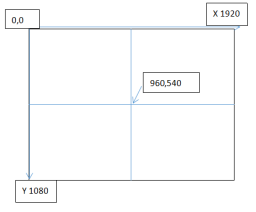
Viewlink Protocol: the center point is 0, the center coordinate of offset (0,0)
Subtract (960, 540) from the pixel coordinates of the locked targets
| 1 | Frame Header | 0xBB | |
| 2 | Address | 0×01 | |
| 3 | X-axis offset | LSB | |
| 4 | FSB | ||
| 5 | Y-axis offset | LSB | |
| 6 | FSB | ||
| 7 | Status | BYTE0 0: Don’t display tracking box1: Display tracking boxBYTE1 0: No target
1: Tracking target BYTE2 0: EO 1: IR BYTE3 0: Single image display 1: PIP display BYTE4 0: Within preset temperature 1: exceed preset temperature BYTE56 Secondary tracking change status in circle, 3 status in total: 1, 2, 3 BYTE 7 Reserved |
|
| 8 | Checksum |